> ## Documentation Index
> Fetch the complete documentation index at: https://docs.turtle.xyz/llms.txt
> Use this file to discover all available pages before exploring further.
# Distribution Dashboard
> What each panel of the distributor dashboard shows: deposits, attributed TVL, and revenue.
The Distribution Dashboard is the distributor-facing section of the [Client Portal](https://dashboard.turtle.xyz). It is where a distribution partner reads how their integration is performing: who deposited, how much TVL is attributed to them, and what revenue that has earned. If you arrived here from a stream, this is also where you watch a live campaign's participation and accrued rewards. This page is a screen reference for what each panel reports and where the underlying data comes from.
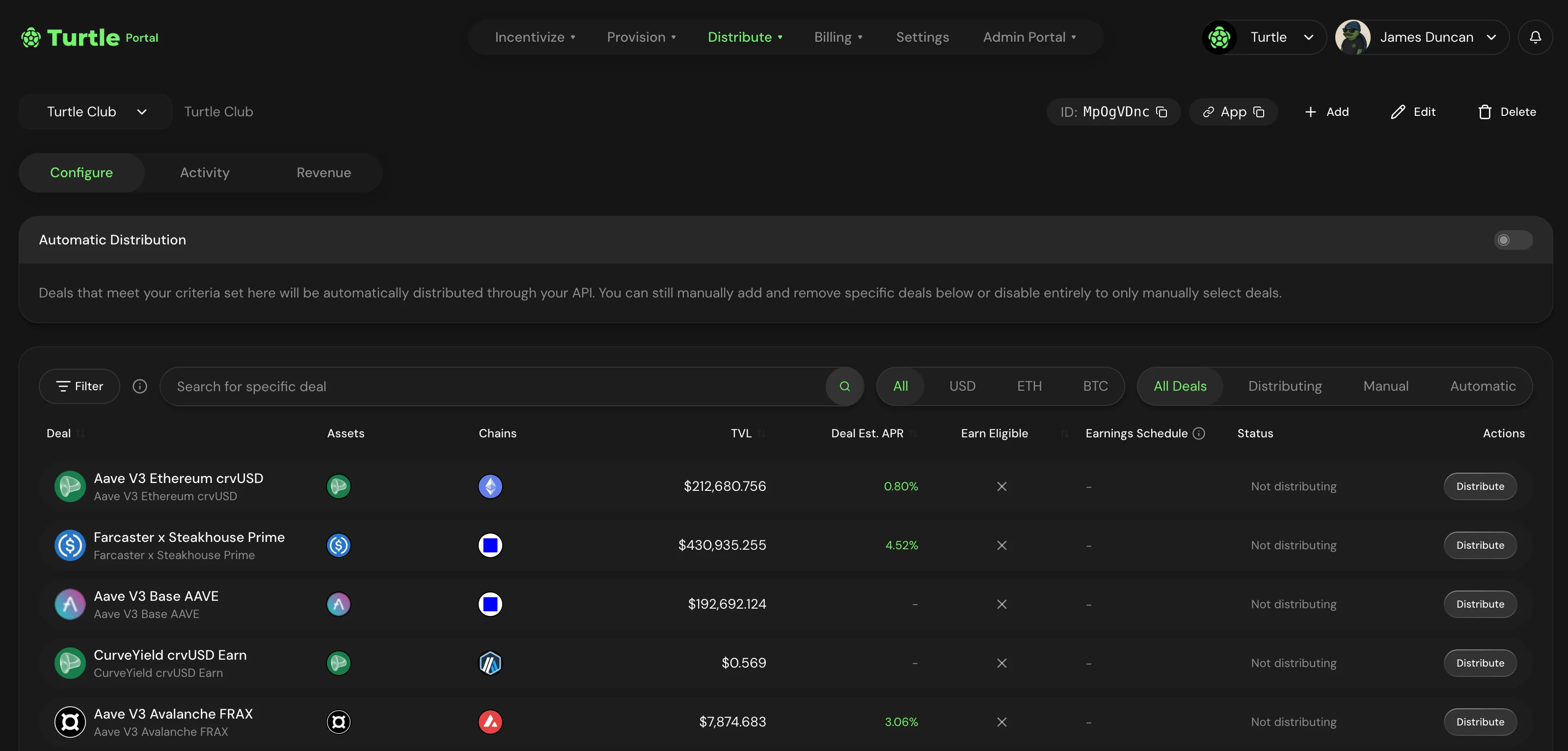 ## Panels
| Panel | What it shows |
| ------------------ | ---------------------------------------------------------------------------------------------------------------------------------- |
| **Deposits** | Deposit activity attributed to your distributor: recent deposits, unique depositors, and volume over time. |
| **Attributed TVL** | The liquidity currently attributed to your integration, tracked over the life of your distribution. |
| **Revenue** | Earnings from the yield generated by the liquidity you route into Turtle vaults, against your configured revenue share. |
| **Distributor ID** | Your `distributor_id`, the identifier that scopes all of the above to your integration and that you pass when integrating the API. |
| **Streams** | For partners running incentive campaigns, participation and accrued rewards for your live streams. |
## Deposits
The deposits panel reads the activity attributed to your `distributor_id`: recent deposits, the count of unique depositors, and volume over time. It is the visual read on the same data the API exposes for programmatic use.
For the wallet-level feed behind this panel (every attributed deposit with its amount, token, chain, and transaction hash), see [Distributor Activity](/sdk/earn-api/deposits).
## Attributed TVL
This panel tracks the liquidity attributed to your integration over time. Attribution ties a deposit to your distributor through the `distributor_id` carried in the on-chain calldata, which Turtle detects automatically. To confirm that a specific deposit was attributed to you, see [Verify attribution](/sdk/earn/verify-attribution).
## Revenue
Distribution partners earn a share of the yield generated by the liquidity they route into Turtle vaults. The revenue panel reports earnings against your configured rate.
Revenue share rates are configured per distributor and are not published in the docs. You read your own rate and earnings in this panel.
## Streams orientation
If you run [Streams](/partner-products/streams/overview) campaigns, this dashboard is where you monitor them after launch: participant counts, recent snapshots, and accrued rewards across the life of each stream. The lifecycle actions (top up, pause, end early) are covered in [Managing a Stream](/partner-products/streams/campaign-management), and the per-wallet data behind the dashboard is at [Get Wallets](/sdk/streams/get-wallets).
## Panels
| Panel | What it shows |
| ------------------ | ---------------------------------------------------------------------------------------------------------------------------------- |
| **Deposits** | Deposit activity attributed to your distributor: recent deposits, unique depositors, and volume over time. |
| **Attributed TVL** | The liquidity currently attributed to your integration, tracked over the life of your distribution. |
| **Revenue** | Earnings from the yield generated by the liquidity you route into Turtle vaults, against your configured revenue share. |
| **Distributor ID** | Your `distributor_id`, the identifier that scopes all of the above to your integration and that you pass when integrating the API. |
| **Streams** | For partners running incentive campaigns, participation and accrued rewards for your live streams. |
## Deposits
The deposits panel reads the activity attributed to your `distributor_id`: recent deposits, the count of unique depositors, and volume over time. It is the visual read on the same data the API exposes for programmatic use.
For the wallet-level feed behind this panel (every attributed deposit with its amount, token, chain, and transaction hash), see [Distributor Activity](/sdk/earn-api/deposits).
## Attributed TVL
This panel tracks the liquidity attributed to your integration over time. Attribution ties a deposit to your distributor through the `distributor_id` carried in the on-chain calldata, which Turtle detects automatically. To confirm that a specific deposit was attributed to you, see [Verify attribution](/sdk/earn/verify-attribution).
## Revenue
Distribution partners earn a share of the yield generated by the liquidity they route into Turtle vaults. The revenue panel reports earnings against your configured rate.
Revenue share rates are configured per distributor and are not published in the docs. You read your own rate and earnings in this panel.
## Streams orientation
If you run [Streams](/partner-products/streams/overview) campaigns, this dashboard is where you monitor them after launch: participant counts, recent snapshots, and accrued rewards across the life of each stream. The lifecycle actions (top up, pause, end early) are covered in [Managing a Stream](/partner-products/streams/campaign-management), and the per-wallet data behind the dashboard is at [Get Wallets](/sdk/streams/get-wallets).